Unpacking UPX (Static) - brbbot
Overview
A look at unpacking a UPX-packed sample from vx-underground:
https[:]//vx-underground[.]org/Samples/Families/Brbbot
The goal here is simple—identify packing, understand what was modified, and get a clean unpacked binary for further analysis.
Sample Info
$ file brbbot.exe
brbbot.exe: PE32+ executable for MS Windows 5.02 (GUI), x86-64, 3 sections

$ sha256sum brbbot.exe
f9227a44ea25a7ee8148e2d0532b14bb640f6dc52cb5b22a9f4fa7fa037417fa  brbbot.exe
Static Analysis
Firstly, we can drag the sample into tools like VirusTotal and PEStudio to get a general understanding. The sample is well analyzed at this point, and VirusTotal shows that 58/71 security vendors have flagged the file as malicious.

We can also read the provided “Code Insights” within VirusTotal, which give us the bulk of the information we are looking for.
Code Insights:
“The sample is a packed malicious loader or Trojan, likely a variant of the UPX packer as evidenced by the ‘NPX0’ and ‘UPX1’ section names and the entry point logic. The binary performs self-unpacking in ‘sub_14001a510’, which includes manual import resolution (LoadLibraryA/GetProcAddress), memory protection modifications (VirtualProtect), and a final jump to the Original Entry Point (OEP) at 0x140003f94. Key malicious behaviors include host identification via ‘gethostname’ and the potential for command-and-control communication through ‘InternetOpenA’. The use of a modified packer and the presence of obfuscated strings are indicative of an attempt to evade static signature detection.”
VirusTotal aside, we could begin to form our own conclusions through PEStudio.
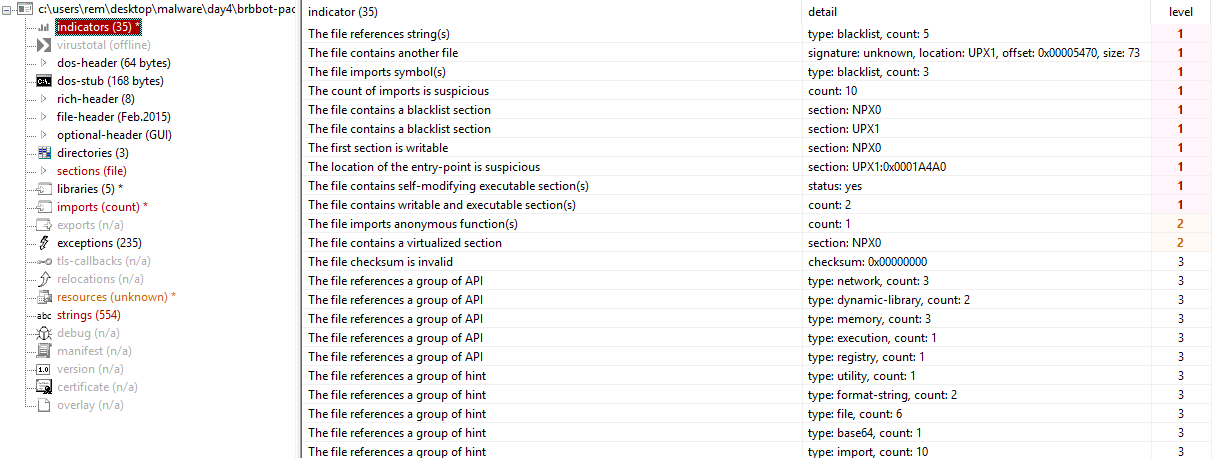
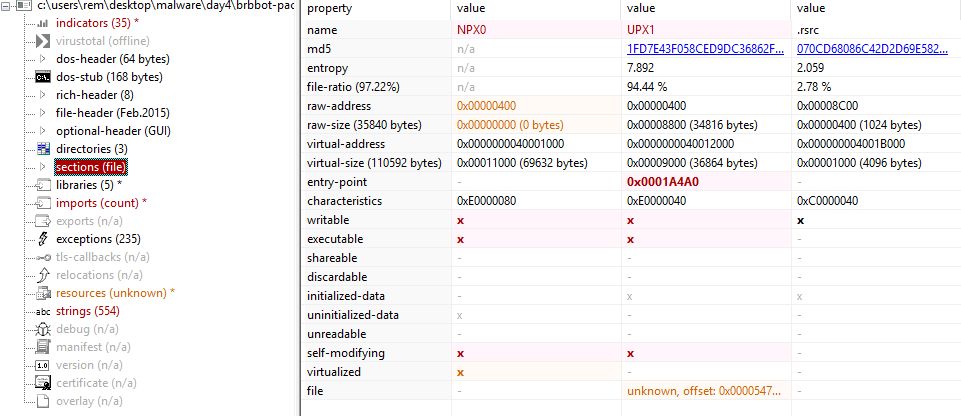
Within the “Indicators” tab, we can see UPX and NPX listed as sections. Upon viewing the “Sections” tab, we see a section named “UPX1” with a rather high entropy. Microsoft lists the common section headers within their documentation here:
https://learn.microsoft.com/en-us/windows/win32/debug/pe-format
You’ll note that UPX1 and NPX0 are not listed. So what could this high-entropy section that takes up ~95% of the file be?
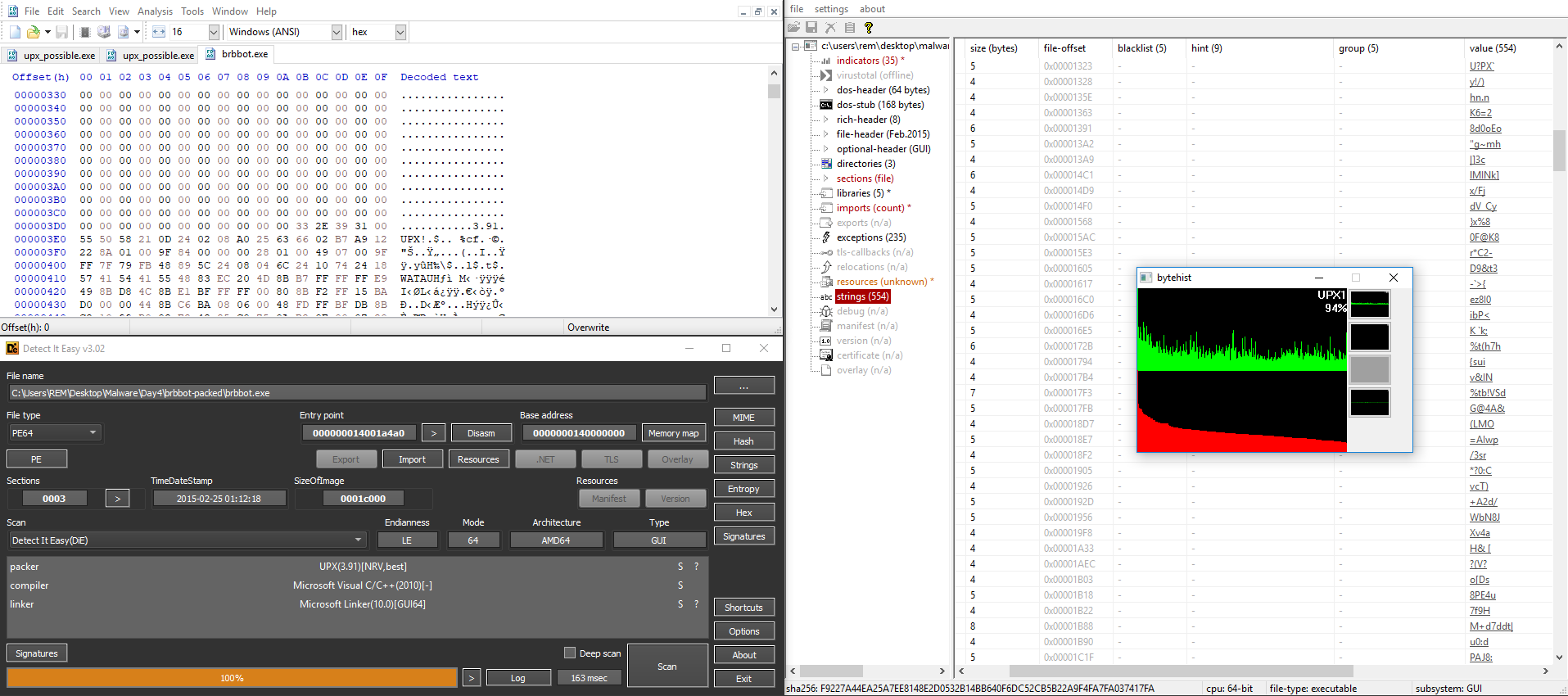
There are various tools that can help come to this same conclusion. Within a hex editor, we can see an explicit UPX version (UPX 3.91) at the beginning of the high-entropy section of the PE. Detect It Easy identifies UPX as the packer used within the PE, bytehist shows very high entropy within the UPX section, and a look at the strings within the PE shows that they are almost all unreadable. This strongly indicates that the binary is packed, and specifically with UPX.
$ man upx
UPX(1)

NAME
       upx - compress or expand executable files

SYNOPSIS
       upx [ command ] [ options ] filename...

ABSTRACT
       The Ultimate Packer for eXecutables

       UPX is a portable, extendable, high-performance executable packer for several different executable formats. It achieves an excellent compression
       ratio and offers very fast decompression. Executables suffer no memory overhead or other drawbacks for most supported formats because of in-place decompression.
UPX is, fortunately, in the man pages, and according to their website:
“UPX is a free, secure, portable, extendable, high-performance executable packer for several executable formats.”
We can use the information from the man pages to attempt unpacking:
$ upx -d brbbot.exe
                       Ultimate Packer for eXecutables
                          Copyright (C) 1996 - 2020
UPX 3.96w       Markus Oberhumer, Laszlo Molnar & John Reiser   Jan 23rd 2020

        File size         Ratio      Format      Name
   --------------------   ------   -----------   -----------
upx: brbbot.exe: CantUnpackException: file is possibly modified/hacked/protected; take care!

Unpacked 0 files.
And it fails, though why is still unclear.
So let’s consolidate what we know:
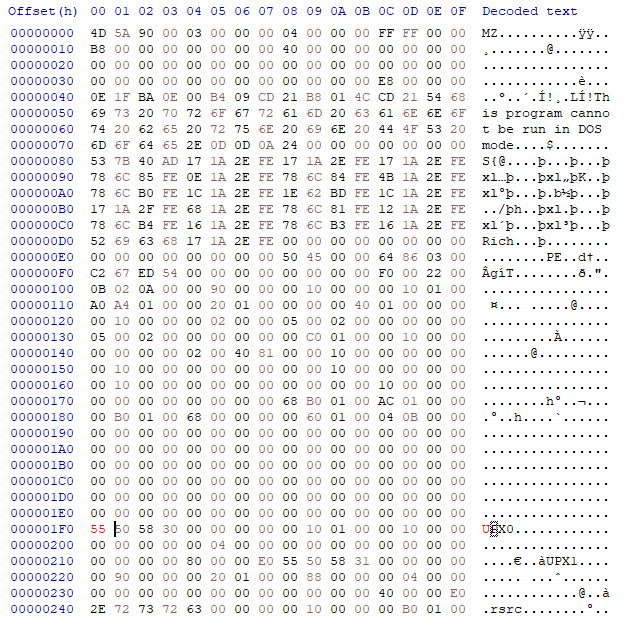
- The PE has section headers: NPX0, UPX1, .rsrc
- The UPX section has high entropy and takes up the majority of the file
- NPX is small on disk, but its virtual size is 69632 bytes
That virtual size is quite large, and I would assume this is where the unpacking logic takes place.
So where do the names of these sections come from?
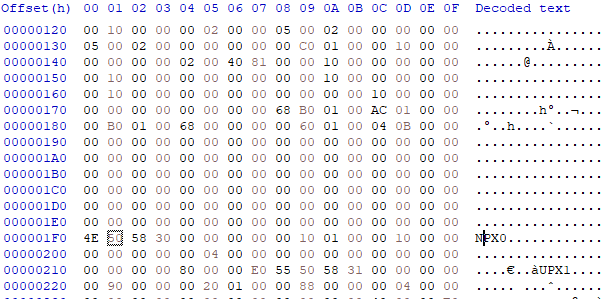
Looking through the source code of UPX, I was able to find that UPX names these sections starting at UPX0 and looks for that section to begin unpacking. Given our earlier error message:
“file is possibly modified/hacked/protected; take care!”
it seems that some modification has indeed been made.
Within a hex editor, we can rename this section from NPX0 to UPX0 and try again.
$ upx -d upx_possible.exe -o unpacked_brbbot.exe
                       Ultimate Packer for eXecutables
                          Copyright (C) 1996 - 2020
UPX 3.96w       Markus Oberhumer, Laszlo Molnar & John Reiser   Jan 23rd 2020

        File size         Ratio      Format      Name
   --------------------   ------   -----------   -----------
     75776 <-     36864   48.65%    win64/pe     unpacked_brbbot.exe

Unpacked 1 file.
With that, we have successfully unpacked brbbot and are ready for further analysis.
- https://learn.microsoft.com/en-us/windows/win32/debug/pe-format
- https://upx.github.io